
Reasons to upgrade your shoes: comfort, safety, performance
Upgrading your shoes restores lost cushioning, cuts your injury risk, fixes fit problems that have crept in unnoticed, and gives you back the energy return that made your favourite pair feel good in the first place. Podiatry guidance, including the Cleveland Clinic’s running shoe recommendations, points to a handful of physical warning signs and a rough mileage marker worth knowing before your next run.
The core reasons to upgrade, in brief:
- Comfort and cushioning — foam that no longer springs back means every step lands harder.
- Injury prevention and joint protection — worn midsoles shift stress onto ankles, knees and hips.
- Better fit and biomechanics — a shoe stretches and packs down differently to how it started.
- Improved performance and energy return — fresh foam gives you back the push-off you’ve been missing.
Key Takeaways
Worn shoes lose cushioning and structural support gradually, which raises injury risk long before the damage becomes visually obvious.
| Point | Details |
|---|---|
| Watch for physical wear signs | Check midsole creasing, outsole wear into the midsole, and heel counter stiffness regularly. |
| Use mileage as a guide, not a rule | The 300–500 mile range from podiatry sources shifts with weight, terrain and gait. |
| Unexplained pain is a signal | New aches after routine activity often point to footwear failure before training error. |
| Replace even low-mileage shoes when symptoms appear | Pain, injury, pregnancy or a training change justify upgrading early. |
| Choose technology that restores cushioning | YDA’s footwear technology targets the energy return and stability that worn shoes lose. |
This article is general information, not a substitute for advice from a qualified doctor. Consult a qualified healthcare professional about your own circumstances before acting on anything here.
Table of Contents
- How worn shoes affect your body and raise injury risk
- What do shoe technology upgrades actually give you?
- What are the physical signs a shoe needs replacing?
- How long do shoes actually last?
- Should you replace shoes even without high mileage?
- How should you choose and break in a replacement?
- What does the clinical research actually say?
- A habit worth adopting
- Where YDA fits into your next pair
- Sources
How worn shoes affect your body and raise injury risk
Your shoes are the only thing between your feet and the pavement. Once that interface degrades, so does everything built on top of it. Kaiser Permanente’s guidance on footwear puts it plainly: shoes absorb shock, support your arches and keep your legs aligned, so a shoe that’s stopped doing its job can trigger pain in the foot, knee, hip and lower back.
The mechanism is straightforward once you see it. Midsole foam compresses unevenly over thousands of strides, the heel counter softens, and the outsole wears down faster on one edge than the other. None of this happens all at once, so your gait adjusts gradually to compensate, and you don’t notice the change until something starts to hurt. That compensation is where the real risk lives:
- Uneven outsole wear rolls your foot into a slightly different position on every stride.
- A softened heel counter lets your heel wobble instead of locking in place.
- Compressed midsole foam stops absorbing shock, passing that force straight up the leg.
Clinical guidance from bodies like the American Academy of Podiatric Sports Medicine treats these as measurable, checkable failures rather than vague “the shoe feels old” complaints.
Pro Tip: If you notice a new ache in your shin, knee or hip after a routine run you’ve done a hundred times before, check your shoes before you check your training plan. Worn footwear is one of the most overlooked causes of sudden, unexplained soreness.
What do shoe technology upgrades actually give you?

A newer pair isn’t just about looks. Modern cushioning systems, more responsive foams and reinforced heel structures work together to change how a run actually feels underfoot. Newer builds tend to add breathable uppers, improved traction and more responsive cushioning, each addressing a different failure point in an ageing shoe.
What you should expect from a genuine upgrade:
- Restored cushioning that absorbs impact instead of transmitting it.
- Greater energy return, so the foam pushes back rather than just flattening.
- Improved stability, particularly around the heel and midfoot.
- Breathable uppers that reduce heat and moisture build-up on longer efforts.
- Better traction, especially noticeable on wet pavement or loose trail surfaces.
You’ll usually feel the difference within the first kilometre. A fresh midsole has spring in it, your landings feel steadier, and there’s less of that dull ache in your calves and knees by the end of the session. That’s not marketing language, it’s cushioning technology doing the job it was designed for before compression foam started ageing out. The point isn’t that new shoes feel different because they’re new. It’s that they feel different because the materials that were supposed to absorb shock and rebound are actually doing it again.
What are the physical signs a shoe needs replacing?
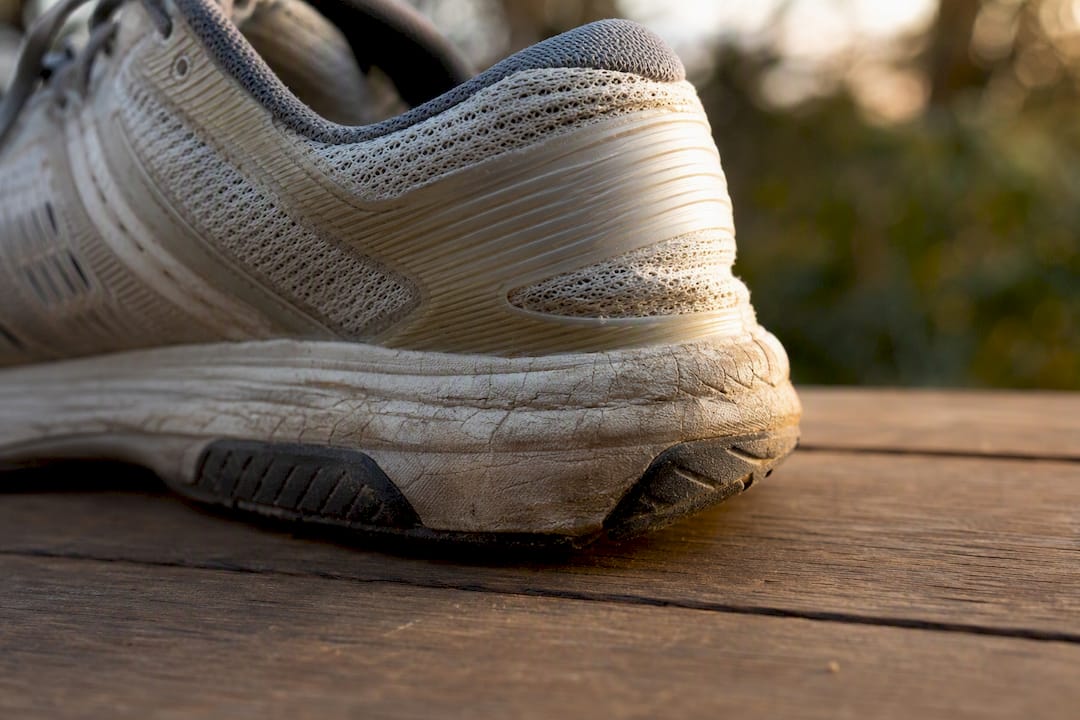
Some signs you can spot in ten seconds; others take a short test run. Either way, these are the checks that matter more than how the shoe looks on the shelf.
Run through this checklist:
- Midsole creasing or compression — deep, permanent creases across the forefoot that don’t smooth out.
- Outsole worn “into the white” — tread worn down to the midsole material underneath.
- Thinned upper — you can feel the ground or road texture through the top of the shoe.
- Collapsed or flexible heel counter — squeeze the back of the shoe; it should resist, not fold.
- Uneven sole wear — one edge or corner worn noticeably more than the rest.
- New, unexplained aches — soreness in feet, shins or knees that wasn’t there before.
Mileage guideline: Podiatrists commonly cite a replacement window of roughly 300 to 500 miles for running shoes, with the AAPSM using the same range alongside visible midsole wear as the trigger point. That figure is a starting point, not a deadline. A lighter runner on soft trails might get closer to 500 miles; a heavier runner training on concrete could see breakdown well before 300.
Three quick tests you can run in-store or on a short loop:
- Bend it. Hold the shoe by the toe and heel and flex it. It should crease at the forefoot only, not collapse in the middle.
- Twist it. Grip the toe and heel and twist gently. Some give is normal; a shoe that wrings out like a cloth has lost its structure.
- Compare it. Put the worn shoe next to an identical new pair and press a thumb into the midsole at the heel. If the old one barely resists, the foam is done.
Pro Tip: Rotate two pairs and you’ll feel the wear pattern far sooner. Swapping between a fresher pair and an older one on alternating runs makes the drop in cushioning obvious in a way you’d never notice wearing one pair every day.
How long do shoes actually last?
There’s no single number that applies to everyone, because lifespan depends on far more than distance covered. Usage intensity, body weight, terrain, gait and even how the midsole foam is constructed all shift that 300 to 500 mile marker up or down.
Factors that shorten or extend lifespan:
- Usage intensity — daily training breaks down cushioning faster than occasional runs.
- Runner weight — more load per stride compresses foam more quickly.
- Terrain — concrete and asphalt wear shoes faster than soft trail or track surfaces.
- Gait and running style — overpronation or a heavy heel strike concentrates wear in specific zones.
- Shoe construction — denser midsole foams tend to resist compression longer than softer, more cushioned ones.
- Storage and perspiration — damp storage and heavy sweat accelerate material breakdown.
Sensible habits to stretch the useful life of a pair: rotate between two pairs rather than wearing one daily, avoid using running shoes as your all-day everyday shoe, and let them dry fully between sessions instead of stuffing them straight back in a bag.
Here’s the part most people miss: even shoes that never leave the box can degrade. Materials dry out and adhesives weaken over time, so the AAPSM suggests treating shoes older than roughly a year with some caution, particularly if they’ve been stored somewhere hot or humid.
Should you replace shoes even without high mileage?
Mileage is a guideline, not a rule, and several situations justify replacing a pair well before you hit 300 miles.
Consider upgrading early if you notice:
- Sudden pain during or immediately after a run that wasn’t there before.
- Weight gain or pregnancy, both of which change load distribution through the foot.
- A jump in training volume or a switch to rougher terrain.
- A new injury or diagnosed condition affecting your feet, ankles or knees.
- A shoe that suddenly feels unstable, even if the mileage counter says it’s “fine”.
If a shoe hurts, don’t try to squeeze out the last of its mileage to justify the purchase. Comfort and pain-free movement matter more than getting your money’s worth out of a pair that’s already working against you.
How should you choose and break in a replacement?
Buying on looks alone is how people end up back here in six months. A proper fit check takes a few extra minutes and saves you from a repeat purchase.
Work through this before you buy:
- Match the shoe to your activity — a daily trainer, a racing shoe and a trail shoe are built for different jobs.
- Check the fit properly — roughly a thumb’s width of space at the toe, with the heel held snugly, not sliding.
- Test the arch support and flexibility — the shoe should flex where your foot naturally bends, not before or after.
- Press into the midsole — it should feel supportive underfoot, not flat or dead.
Once you’ve narrowed it down, try both the old and new pair with your usual running socks and put them through a short real test, not just a walk around the shop. A treadmill session or a 1 to 2 kilometre out-and-back tells you far more than standing still ever will, an approach consumer testing guides like Runner’s World recommend precisely because static fitting misses how a shoe behaves under load. Pay attention to how your foot feels at the finish, not just at the start.
Once you’ve picked the pair, resist the urge to run a marathon in them on day one. Build up gradually over two to three weeks, and keep rotating with your older pair during that period so the new midsole isn’t taking every bit of impact from the start. For a wider walkthrough of the buying process, YDA’s footwear selection guide covers the fit fundamentals in more depth.
Pro Tip: Write the purchase date and starting mileage on the inside tongue with a marker, or log it in a running app. It sounds basic, but it’s the single easiest way to know exactly when you’re approaching that 300 to 500 mile window instead of guessing.
What does the clinical research actually say?
Strip away the marketing and the guidance from clinicians is fairly consistent. The Cleveland Clinic frames footwear as the primary interface between your body and the ground, and argues that shoes need to match your natural gait to avoid forcing your joints to compensate for a poor fit.
A scoping review published in Applied Sciences reinforces this from a different angle, finding that well-fitted shoes meaningfully affect foot health outcomes, particularly in older adults, and that basic educational material on shoe selection improves the choices people make.
Translating that into action:
- Inspect midsoles regularly, not just when something starts to hurt.
- Set a replacement plan based on mileage and visible wear together, not either alone.
- See a podiatrist if pain persists after you’ve already replaced worn footwear.
None of this requires expensive gear or a lab test. It requires actually looking at your shoes every few weeks instead of waiting for pain to force the issue.
A habit worth adopting
I’ve read enough podiatry guidance and shoe-construction breakdowns to know most people don’t replace shoes too early. They replace them too late, usually after an ache has already settled in. The fix isn’t complicated: the day you unbox a new pair, write the date on the tongue and log your starting point in whatever running app you already use. That single habit turns “I think these are getting old” into “these have done 380 miles and it’s time,” which is a far better basis for a decision than how the tread looks under shop lighting.
Where YDA fits into your next pair
If the checklist above told you your current pair is on its way out, that’s exactly the gap YDA’s footwear technology is built to close. The focus is on restoring the cushioning, energy return and stability that worn foam quietly takes away, without you having to guess whether a shoe will actually feel different once you’re a few kilometres in.

You can see how that cushioning and energy-efficiency technology works on the YDA Technology page, including the details on midsole construction that most product listings skip. If you’re unsure which fit suits your gait, a quick fit conversation before you buy is worth more than guessing from a size chart, and if a pair doesn’t feel right once it arrives, the returns process means a wrong fit isn’t a wasted purchase. Start by checking the technology page against the wear signs you’ve just identified in your current shoes.
Sources
- How to pick the running shoe that is best for you | Cleveland Clinic Health Essentials
- How Do I Know When It Is Time To Replace My Athletic Shoes | AAPSM
- Step into health: How the right shoes can transform your comfort, posture and well-being | Kaiser Permanente
- When you should replace your running shoes, according to podiatrists | Women’s Health
- When to replace your running shoes | Runners World UK